I’ve been using GNOME as my main desktop for a while now; I needed something that “just works”, with minimal configuration, so I could focus on wasting all my time configuring Emacs instead. However, I was a long-time tiling window manager user, so I thought I’d have a look at the available tiling extensions for GNOME and discovered PaperWM.
The idea in PaperWM is that all windows on a desktop are arranged in a single long row, and as you switch between windows, it scrolls left and right. This nicely complements the arbitrarily long vertical scrolling that you see in most document-viewing applications: you usually want these to fill the full height of the monitor, but the horizontal space is often wasted with other window managers, especially in full-screen text editors. I’m not honestly sure if I like this approach (it makes the platonic ideal 60/40 split more annoying to set up than vanilla GNOME), but it has one extremely niche benefit: it is the best window manager possible to use with Speedbar.
Speedbar is a built-in Emacs package that spawns a floating frame1 that can show a tree view of directories, sections in a file, and useful supplemental information for a few other contexts. This functionality would be useful, but most are probably put off immediately by the fact it spawns an extra floating window. This style of spawning many small windows that provide distinct functionality is somewhat old-fashioned; GIMP is the only other program I can recall ever functioning like this by default on Linux. If, as is common, the user snaps their windows to the edges of the screen, or maximises Emacs, Speedbar appears on top of other windows, messing with their layout.
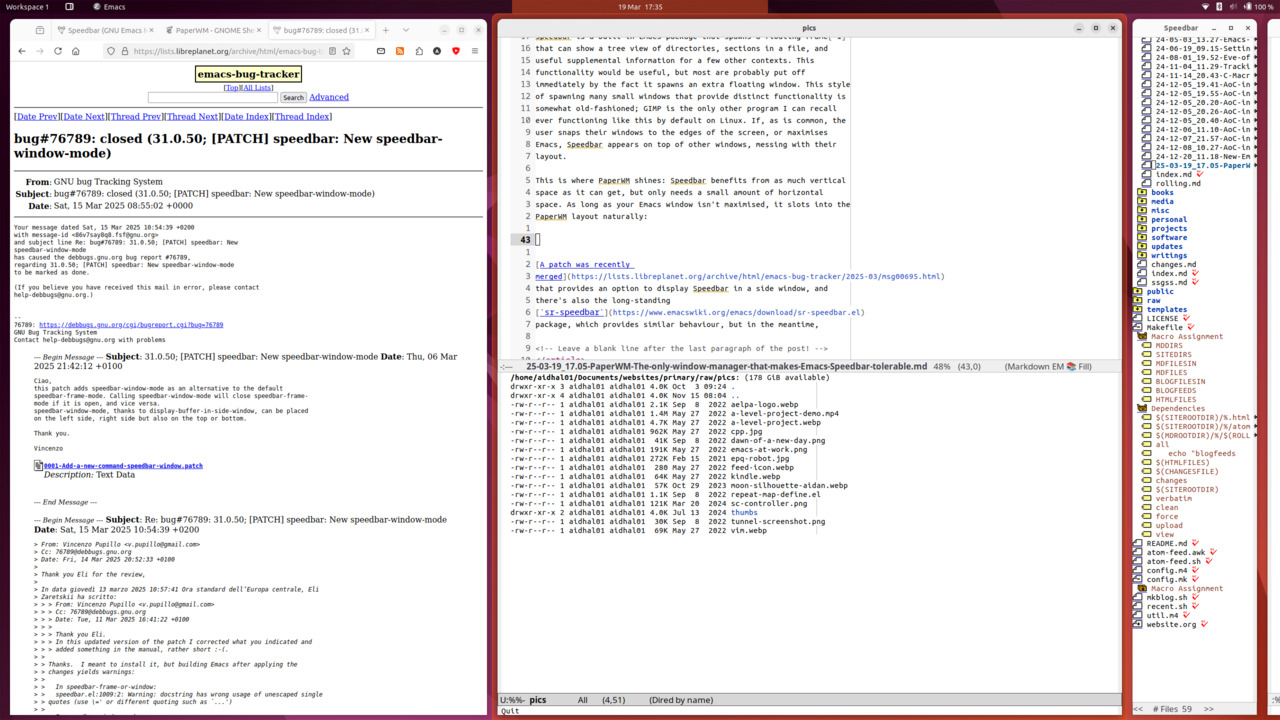
This is where PaperWM shines: Speedbar benefits from as much vertical space as it can get, but only needs a small amount of horizontal space. As long as your Emacs window isn’t maximised, it slots into the PaperWM layout naturally:
A patch was recently merged
that provides an option to display Speedbar in a side window, and
there’s also the long-standing
sr-speedbar
package, which provides similar behaviour, but in the meantime, this is
probably the least annoying way to use Speedbar.
Footnotes:
The Emacs term for Operating System windows, used to avoid ambiguity.