I recently got back into Minecraft (Java Edition, of course), but due to my keyboard-related RSI, I decided to try using a controller to play it.
Minecraft Java doesn’t have built-in controller support, so I installed the Controlify mod, which adds this functionality, with a lot of customisation options. I started off using my Switch Pro controller, which is supported by Controlify, albeit without gyro input. This worked well enough, but aiming with the right control stick felt much more restrictive than using a mouse. That brings us to today, when I decided to try using my Steam Controller.
The Steam Controller was part of Valve’s early, failed attempt to create a game console ecosystem (the Steam Machines). Its most distinctive feature is the pair of circular touchpads it has in place of a typical D-pad and right control stick. This design was made with a major objective of allowing games that were originally designed for keyboard and mouse controls to be played with a gamepad. This is normally achieved through the highly flexible Steam Input configuration system that is built into Steam, but it would have been awkward for me to use for Minecraft, which is not a Steam game.
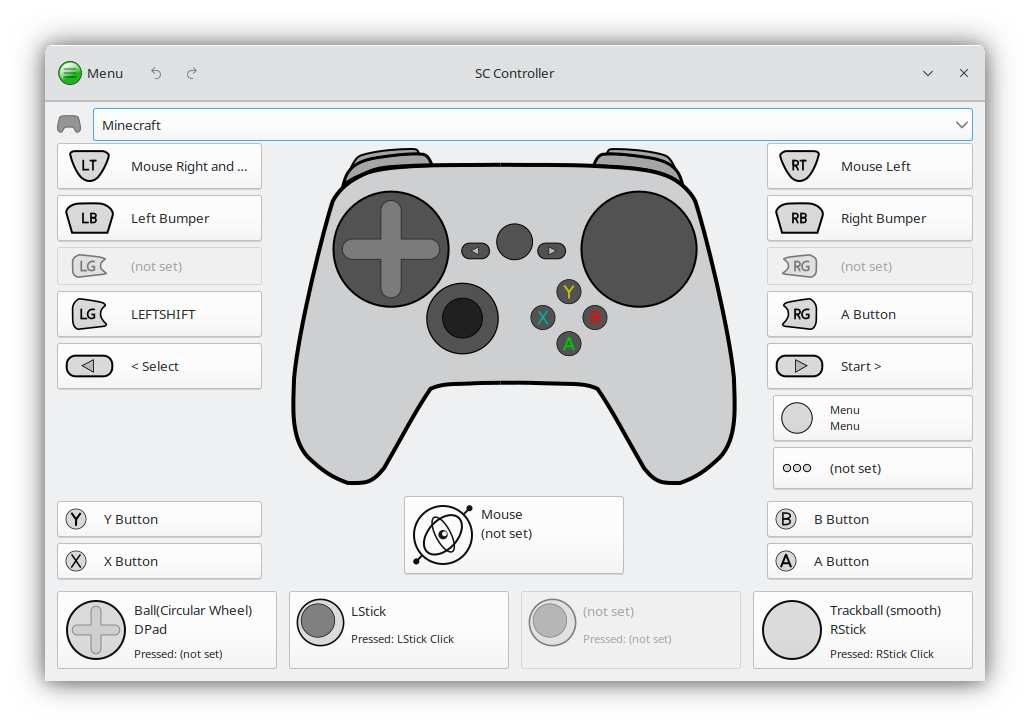
Instead, I used SC Controller. This provides a GTK-based GUI for configuring the Steam Controller that is totally independent of Steam itself. With that, I was able to set up my Steam Controller to interact nicely with Minecraft. The layout is heavily inspired by this video, especially the camera controls. In that video, the Steam Controller’s inputs are all mapped to keyboard and mouse inputs, while my setup has the small advantage of “true” analogue movement with the left stick.
I have left and right mouse bound to the right and left triggers, with shift on the left grip button. This allows me to use all the “advanced” inventory management inputs that work with a mouse, but were supported poorly (or not at all) by Controlify. The other big improvement of this layout over what I had on the Switch Pro controller is having jump bound to the right grip button. This means I can keep my right thumb on the camera touchpad at all times, and fluidly turn and jump at the same time, which was not possible on the Pro controller.