I am creating this blog post inside Emacs. After my last post, I have used it some more and realised that it is really quite good. An important part of this realisation was Emacs’ excellent ability to display documentation.
Info
Pretty much the entire editor and most external packages have info pages. It is easy to search the entire set of info pages on the computer, including those for non-Emacs-related programs. Something that will be relevant later on is that, since Emacs isn’t a purely textual program, different typefaces and text sizes can be used where relevant (e.g. monospaced code snippets and large headings).
Even the terminal info page viewer is at least some minimal version of
Emacs, so it’s not surprising they go together nicely. NeoVim has an
info-page viewer but it doesn’t seem to be documented yet so I probably
won’t use it much.
Man
Emacs has two man-page viewers in the standard distributon, Man and
WoMan. There’s not much that can go wrong viewing man pages, but WoMan
is notable for being Elisp-native, so it will run in environments
without an external man program. It also has the mixed blessing of
allowing/forcing the user to interactively select which section to view
a page from when multiple with the same name exist.
It is worth noting that the NeoVim man-page viewer has the minor advantage of being able to apply C syntax highlighting to code snippets, although this only seems to work reliably for the standard library.
HTML
This one is particularly notable, because most programming is
documentation formatted in HTML; specifically, it is usually fairly
plain HTML with a simple layout that can often be rendered quite capably
by the eww web browser that is in the standard Emacs distribution.
They will generally consist of a single column of text, with headings
and code snippets, that eww can represent quite well due in part to
the aforementioned variable typefaces.
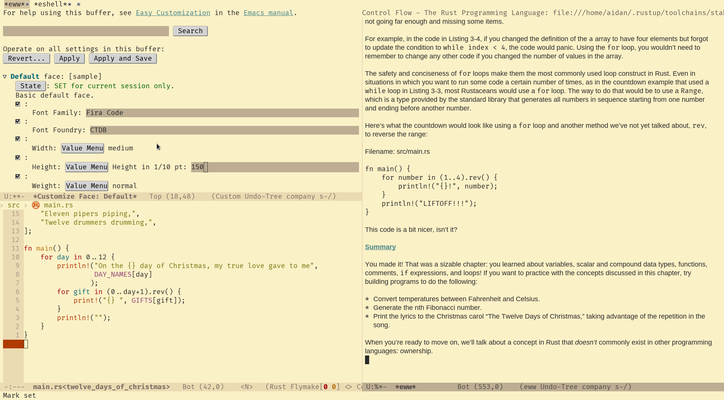
eww.
However, it is worth noting that eww is basically unusable for sites
with almost any kind of dynamic content or with more than the most
trivial of layouts, although eww-readable can be helpful for some
pages, such as the Rust documentation, where it will hide the table of
contents most of the time.
Other Stuff
Emacs has a lot of things that either ’just work’ or can be enabled
within the standard distribution, that *Vim could only replicate with
external plugins, if at all. These include automatic bracket pair
insertion, changing input methods (e.g. to programmer’s dvorak) for text
while keeping key bindings the same, and the integration between the
editor and the terminal that eshell provides.
Conclusion
As I at least implied in the previous post, this does not mean I am ’switching to Emacs’. The phrase implies (admitting to) a deep, unhealthy obsession and personal identification with the tools one uses for programming. I have simply gotten to the point where Emacs will be a more appropriate tool for the job of programming than *Vim in certain situations.
Post-Script
Possibly due to familiarity, I still find it quicker to navigate to a
project directory with cd then start editing a file in *Vim. Its
consistent working directory is also handy for projects that use
Makefiles, since it is necessary to stay in the root/where the main
Makefile is. I have made small ammendments to this page with *Vim
because of this.